This is a take on the famous dunelm clock found in so many classrooms. These are intended to be printed and stuck together using a push pin, to aid children when telling the time.
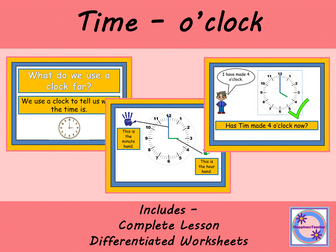
A complete Maths lesson for introducing time in a step by step manner.
This interactive lesson focuses on o’clock and introduces key terms to the children before teaching children how to read o’clock. The lesson includes three differentiated o’clock worksheets and a short plenary.
Aimed at Early Years and Year 1 children although could be used as a booster session for Year 2 children.
For worksheets only see https://www.tes.com/teaching-resource/time-o-clock-differentiated-worksheets-12158031
For my Time Bundle see https://www.tes.com/teaching-resource/resource-12254838
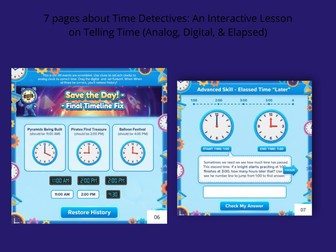
Engage your students in a thrilling time-travel adventure with Time Detectives, an interactive PDF or digital resource designed to master the essential skill of telling time! The Timeline is broken, and only your students—the newly appointed Time Agents—can fix it by learning the secret code: T.I.M.E…
This comprehensive lesson covers analog and digital time-telling up to the half-hour and introduces the concept of elapsed time. The engaging, mission-based structure motivates students as they work to restore history!.
Key Features and Learning Objectives:
Analog Clock Mastery (Tools of the Trade): Students learn to identify the hour and minute hands, and read times to the hour (“o’clock”) and half-hour (“half past”).
Digital Clock Decoding: Introduces the digital clock format and teaches students how to recognize the hour and minutes before and after the colon.
Time Matching Missions: Includes matching exercises to connect analog and digital representations of time (e.g., matching a clock showing 5:00 to the digital time 5:00).
Final Timeline Fix: A capstone activity where students must set analog clocks to specific times (e.g., 11:00 AM, 2:00 PM, 4:00 PM) to “restore history”.
Introduction to Elapsed Time (Advanced Skill): Students use a number line model to calculate the duration of an event (e.g., from 1:00 to 3:00).
Interactive/Printable Activities: Designed to allow students to drag labels, move hands, type in times, and log their findings in a “Mission Log” and “Time Traveler’s Diary”.
Mission Complete & Certificate: Ends with a celebration, declaring the student an Official Time Keeper and includes a space for a personalized certificate.
Perfect for 2nd and 3rd-grade students, remote learning, math centers, or as a fun homework assignment!
Interactive digital clock that counts down from 20 mins to 1 min. There are several powerpoint slides that start from each minute and counts down to zero. You can copy and paste the slide from the powerpoint to nother so fits in nicely with the flow of the presentation. Used it for timed challenges with children across KS1 & KS2, is great so they can see exactly how much time they have left. Is a big display too so easily seen.
Hi Guys,
Here I’ve made an interactive clock for you. It’s perfect for primary teachers teaching young learners the time. It’s completely interactive. You’re able to control where both hands of the clock go with simple clicks.
Watch the demonstration video for how to use it.
All the best.
Alex
A no-prep telling time game where students match time expressions to analogue clocks. Great for primary, ESL, EFL and whole-class review.
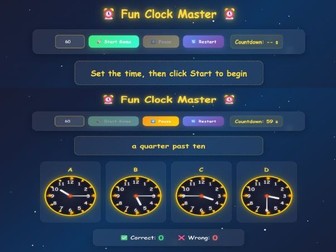
Make telling time practice more engaging with this interactive HTML clock game. Students read a time expression, look at four analogue clock options, and click the correct clock before the timer runs out.
This resource is ideal for practising common time expressions such as o’clock, a quarter past, half past and a quarter to. It works well as a whole-class game, warm-up activity, review task, team competition, starter activity, maths centre activity or end-of-lesson challenge.
The game includes:
Interactive analogue clock questions
Four multiple-choice clock options
Countdown timer
Start, pause and restart buttons
Correct and wrong answer scoring
Mistakes review section
Colourful classroom-friendly design
Browser-based HTML format
Best for:
Primary lessons
Telling time practice
ESL / EFL classes
Maths / measurement review
Vocabulary practice
Speaking warm-ups
Whole-class games
Interactive whiteboard activities
No-prep classroom revision
Please note: This is an HTML digital resource. For best results, download the file and open it in a modern web browser such as Chrome, Edge or Safari.
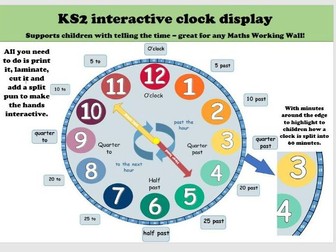
A display to support telling the time, perfect for any Maths working wall. All you need to do is print it, laminate and cut it and then add a split pin to the clock hands to make it interactive.
It comes with time cards to decorate around the edge and show the different times, e.g 5 past, 10 past ect. The clock edge is also split into 60 to show how time is counted in 60 minutes.
I use this with my class with conjunction with our White Rose time unit, but also throughout different lessons and to get the children to go and change the time on the interactive clock. For example, I might ask one child to set the clock to lunch or home time and then we look at how we know they are correct or how to help them to get it right.
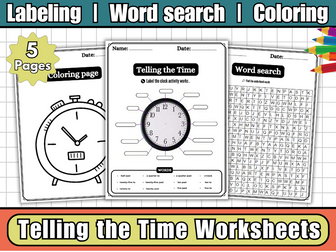
Help children master one of the most essential life skills with this fun and visual Telling the Time Labeling Worksheet Pack! Perfect for KS1–KS2 learners, these printable worksheets focus on reading and labeling both analog and digital clocks using key time vocabulary.
What’s Included:
Labeled clock face diagrams showing:
hour hand, minute hand, clock numbers (1–12), and 5-minute intervals
Blank labeling sheets for independent practice
Worksheets for o’clock, half past, quarter past, and quarter to
Optional coloring clock pages for creative engagement
A word search puzzle with key time-telling terms
Learning Objectives:
Identify and label the parts of a clock
Read and write time in analog and digital formats
Understand and use terms like o’clock, half past, quarter past, quarter to
Strengthen maths vocabulary and time-reading fluency
Why Teachers Love It:
Easy to use — no prep required
Supports KS1–KS2 maths curriculum on time
Perfect for visual learners, EAL students, and extra practice
Ideal for use in math centers, classwork, homework, or assessment
Perfect For:
Year 1–3 learners
Time-telling introduction and practice
Morning maths starters or rotation activities
Revision, reinforcement, or interactive notebooks
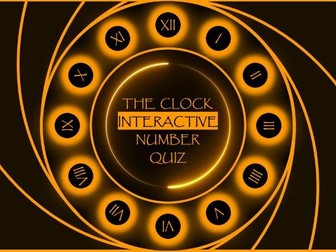
Ready to race against time? A thrilling challenge that puts your knowledge and speed to the test. Sharpen your skills and prove you can master the clock by answering a series of questions as you advance through the hours. Each correct answer is your key to moving forward, bringing you closer to the finish line in this ultimate race against time.
Playing “The Clock” is simple and intuitive. You will begin at the 12 o’clock position. Each number on the clock face represents a new question. Read the question carefully and click on the corresponding number that you believe holds the correct answer. Get it right, and you will advance to the next number, moving forward in the time race. An incorrect answer will keep you in your current spot, challenging you to try again. The goal is to successfully answer all 12 questions and complete the clock face, proving you have mastered the quiz and beaten the clock!
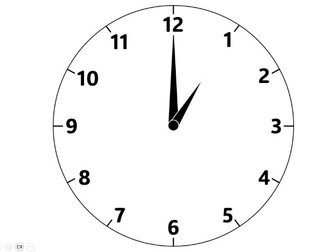
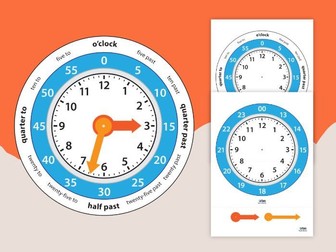
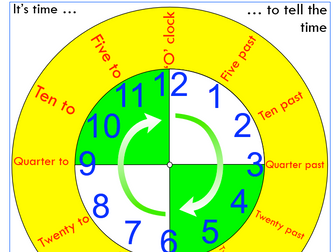
This 12 and 24 hour clock template is the perfect way to make your time display interactive as well as doubling up as a tactile resource to support your pupils whilst they learn how to tell the time.
There are two different clock face templates to pick from :
A 24 hour plain clock face
A 12 hour clock face with minutes and common telling the time phrases including (o’clock (:00), five past (:05), ten past (:10), quarter past (:15), twenty past (:20), twenty-five past (:25), half-past (:30), twenty-five to (:35), twenty to (:40), quarter to (:45), ten to (:50), five to (:55)).
To create your interactive clock:
Print out your preferred clock face and clock hands
Cut out the clock face and clock hands
Back on card or laminate for longevity (optional)
Create a small cut on the ‘+’ marked on the clock hands as well as in the centre of the clock face
Align the clock hands on top of the clock template with your incisions, push a split pin though the centre and secure
Step back and admire your new interactive resource
This resource comes in colour and a printing friendly black and white version so you can decide how to best utilise this resource in your classroom - you could even get your pupils to design or colour their own interactive clocks!
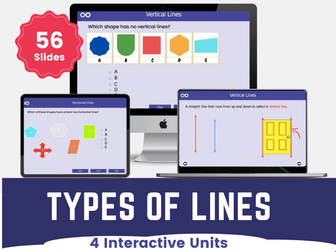
Types of Lines Year 3 Interactive Lesson
Identifying different type of lines is a completely interactive maths lesson with differentiated activities designed for year 3 learners.
**In this lesson, learners can identify:
**
horizontal and vertical lines; and
pairs of perpendicular and parallel lines.
By the end of this unit, students will be able to:
Understand the concepts of horizontal and vertical lines.
Recognize and identify examples of horizontal and vertical lines in the environment.
Differentiate between horizontal and vertical lines based on their orientations.
Apply knowledge of horizontal and vertical lines to basic problem-solving situations.
Understand the concepts of parallel and perpendicular lines.
Recognize and identify examples of parallel and perpendicular lines in the environment.
Differentiate between parallel and perpendicular lines based on their characteristics.
Apply knowledge of parallel and perpendicular lines to basic problem-solving situations.
What’s Included
Three-part Lesson
Self-marking Activities
Fluency, Reasoning and Problem-solving Questions.
Engaging Drag and Drop Activities
Interactive Self-marking Worksheet
Printable Worksheets to Consolidate Learning
These Geometry: Properties of shapes maths resources follows the National curriculum requirement for year 3 mathematics.
Teachers can use the lesson for whole-class teaching and learners can also use it at home.
Love this? View more year 3 topics:
12-hour and 24-hour clock
Perimeter of 2d Shapes
Please leave a review if you find our resources helpful and be sure to follow us if you wish to be kept up to date with when we upload new and exciting resources.
Thank you.
Ignite Classroom Excitement with our Interactive Categories Game!
Add a splash of fun to your classroom with our lively and engaging Categories Game! This interactive resource is designed to captivate students with 10 thrilling rounds, a dynamic spinner for letter selection, and a 1-minute timer to keep the excitement flowing.
for those end-of-semester moments when you need a burst of energy.
THIS GAME COMES AS A POWERPOINT SHOW- it is not editable, but will open as soon as you click on it. Works on any devices that support PowerPoints in show mode.
Key Highlights:
Ten Entertaining Rounds: Dive into a variety of categories with 10 rounds of captivating gameplay. From geography to animals, this game offers a delightful mix of challenges that keep students on their toes.
Interactive Spinner: Spin your way to excitement with the interactive spinner. The element of chance adds an extra layer of fun, making each round unpredictable and engaging.
1-Minute Timer: Keep the energy high with the built-in 1-minute timer for each round. The race against time adds a sense of urgency and turns every category into a thrilling challenge.
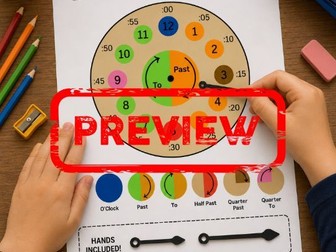
Help children develop confidence telling the time with this colourful and engaging Telling Time Poster and movable clock hands template.
This printable resource supports children as they learn to read analogue clocks, understand key time vocabulary and recognise the relationship between hours and minutes. The included clock hands allow pupils to create different times and practise their time-telling skills in a hands-on way.
Perfect for classroom displays, maths working walls, independent learning, small group activities, interventions and home learning.
Pupils Will Learn
O’Clock
Past and To
Half Past
Quarter Past
Quarter To
Hour Hand and Minute Hand
Reading Analogue Clocks
Time Vocabulary
Included
Telling Time Poster
Movable Clock Hands Template
Printable PDF
Suitable For
KS1
Year 1
Year 2
Home Education
Intervention Groups
Maths Displays
Classroom Learning
Subjects
Maths
Measurement
Time
Analogue Clocks
Resource Types
Display Poster
Printable
Maths Activity
Classroom Display
Interactive Resource
A cut out clock face with hands. You will need to print on thin card, or use glue sticks to glue an A4 print to card, and a box of paper fasteners.
These can be used as individual clocks for pupils to learn to tell the time.
When the lesson is done, pupils can set the time and write it in the box provided.
Then the whole class can display their work and you will have a useful display/resource available to you from then on.
So a fun lesson or two ... and an interactive display to freshen your walls, before the headteacher starts mooching around and tutting about OFSTED, all in one go ... bargain.
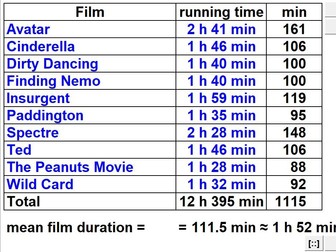
Interactive macro-enabled MS-Excel spreadsheet. Contents: Write an analogue clock’s time in words, am/pm & 24-hour form. Use the mnemonic of months & complete units of time definitions. Find the number of days between two dates of the calendar. Find times around the world using differences between time-zones. Convert a period of time in mixed units to single units & vice versa. Interpret a calculator display as a mixed number fraction of time. Find total time ΣT & time interval ΔT given 2 times to 1, 2 or 3 d.p. Find a film’s length given a start & finish in am/pm or 24-hour form. Find the time by using & completing school, bus & train timetables. Find the time remaining till half-time or full-time plus injury-time. Find the mean duration or average running time of a table of films. Find a simple fraction or decimal (<1) or % of an hour or day. Find a mixed number or decimal fraction (>1) of an hour or day.
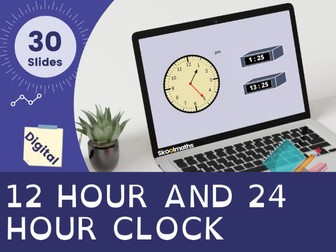
12 Hour and 24 Hour Clock is a completely interactive year 3 measurement lesson with lots of differentiated activities. In this lesson, learners will be able:
to tell and write the time using 12-hour and 24-hour clocks
estimate and read time with increasing accuracy to the nearest minute;
record and compare time in terms of seconds, minutes and hours; use vocabulary such as o’clock, am/pm, morning, afternoon, noon and midnight
This lesson contains 30 interactive pages with lots of drag and drop activities and worksheet for extended work.
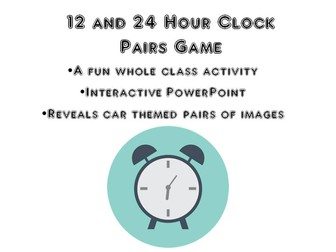
24 Hour Clock Game
This game is a 24 hour clock activity. It is designed as a fun starter activity for converting between the 12 and 24 hour clock. This game is a great consolidation activity for revising the use of the 24 hour clock.
Click on the matching times to reveal images of different cars, picked to help engage the class in the game.
Included: pairs game (an interactive PowerPoint file)
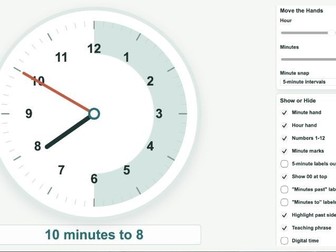
I made this clock during Year 3/4 teaching because I kept finding that existing online clocks didn’t quite match the way analogue time is actually introduced in KS2 classrooms.
Most tools give you a clock. What I actually needed was a clock I could strip back or build up depending on exactly where a child was in their understanding — without clicking through menus or losing the pace of the lesson.
This tool was designed to make that easy.
Almost every element can be turned on or off instantly. For example, you can:
• show or hide minute markers
• reveal or hide the hour hand or minute hand independently
• toggle “past” and “to” labels for the relevant half of the clock
• highlight only the past side to support the past/to distinction
• switch between 5-minute and 1-minute intervals
• show 5-minute numbers around the outside of the clock face
• compare analogue and digital time side by side
• generate random times for quick whole-class questioning, with options to limit to past times, to times or both
The controls are large and permanently visible — designed for use on an interactive whiteboard while you’re also talking to a class.
You can build the clock up gradually as children’s confidence grows, from o’clock and half past through to quarter past, quarter to, five-minute intervals and finally individual minutes.
There is a PDF in the ZIP folder which contains a link and a QR code to access the tool. No installation. Opens in any browser.
I use it in my own classroom. It was built because nothing else did exactly this.
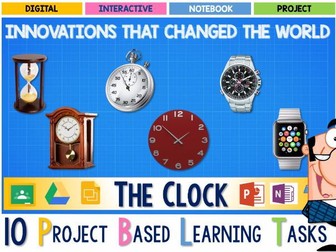
What are the IDEAS, INVENTIONS and INNOVATIONS that shaped our world?
How did they come to be? Who made them? How have they changed? And how did they revolutionize our lives?
This project examines the history of TIME KEEPING since the dawn of time itself, and the invention of THE CLOCK. A device that continues to reinvent itself for thousands of other purposes than just telling the time.
This WEEK LONG Digital Interactive Project draws upon LITERACY, READING, WRITING, (ELA) SCIENCE, TECHNOLOGY ENGINEERING, MATHEMATICS (STEM) THE ARTS AND HISTORY. in a highly engaing independent PROJECT BASED LEARNING task that has been purpose built to operate in a DIGITAL, BYOD or ONE TO ONE classroom.
You can use platforms such as GOOGLE CLASSROOM, MICROSOFT OFFICE, ONENOTE and any other digital learning platform to distribute and manage this project. ABSOLUTELY NO PREP REQUIRED & EVERYTHING IS COMPLETELY EDITABLE.
Your students will have the opportunity to engage with a vast array of DIGITAL TOOLS and ONLINE RESOURCES to create a project which connects with wants and needs as 21st CENTURY THINKERS AND LEARNERS.
THIS PROJECT HAS 10 ACTIVITIES INCLUDING
- Digital Text Response Tasks
- Digital Interactive Timelines
- Digital Cause and Effect
- Digital literacies and writing graphic organizers and templates
- Interactive video response task
- Podcast audio response tasks
- A variety of interactive Writing planners and templates
- Digital Biography Response Tasks
- Digital Data representation and graphing task
- A range of open ended English tasks
- Digital Self assessment tools
** Plus much more
PERFECT AS AN ENGLISH, LITERACY, STEM or HISTORY PROJECT
This is a deep unit of work guaranteed to both inform and showcase your students understanding of some of the great innovations that changed our world.
This is the type of resource which validates and proves the worth of all that technology in your classrooms.
LIKE WHAT YOU SEE?
For more creative ideas and new product updates, be sure to sign up for our EMAIL NEWSLETTER, and visit us on FACEBOOK to take part in our exclusive giveaways.
Parts of speech PowerPoint game. A fun interactive way to practice identifying parts of speech. Students are given two sentences and have thirty seconds to decide what part of speech the underlined words function as in a sentence. They can work with a partner and use wipe-off white boards or write the answers down on paper. After time is up, the answers will disappear. (Timer is built in) Click again to check answers. Advance slide and click to start with a new set of sentences. Grades 3 and up. Supports common core!
36 sentences in all. - HappyEdugator
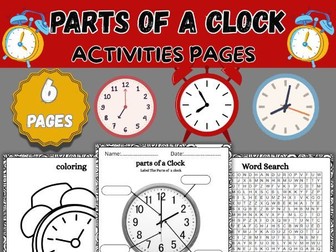
Help your students learn the parts of a clock and the basics of telling time with this engaging activity pack!
Perfect for early learners, this resource combines hands-on activities and creative tasks to make learning fun and interactive.
This prodduct inclues:
Labeling Worksheet: Students will identify and label key parts of a clock, including the hour hand, minute hand, numbers, and face.
Coloring Page: A detailed diagram of a clock for students to color, reinforcing their understanding through creative engagement.
Practice Worksheet: Activities for students to match, identify, and label clock components.
Answer Keys: Complete solutions provided for quick grading and review.
Why this resource is perfect for your classroom or homeschool curriculum:
Supports hands-on and visual learning with interactive tasks.
Helps students build foundational skills for telling time.
Encourages fine motor development through labeling and coloring.
Suitable for group work, independent study, or homework assignments.
Suggested Grade Levels:


 Quick View
 Quick View
 Quick View
 Quick View
 Quick View
 Quick View
 Quick View
 Quick View
 Quick View
 Quick View
 Quick View
 Quick View
 Quick View
 Quick View
 Quick View
 Quick View
 Quick View
 Quick View