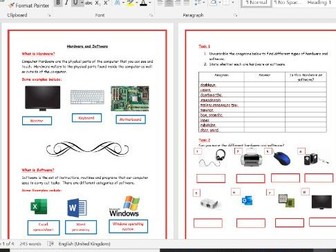
This is an ideal paper-based ICT lesson, homework, or cover lesson. Can be used without computers. Hardware & Software and Input & Output devices suitable for KS3
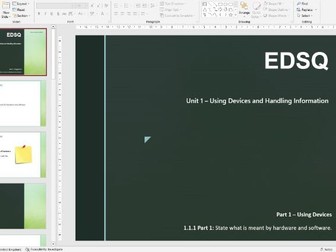
This is an 18 slide PowerPoint presentation to teach the EDSQ (Essential Digital Skills Qualification) Unit 1 - Using Devices - Hardware and Software.
Perfect for Entry Level 3 and Level 1 students.
It is a full teaching PowerPoint, with learning outcomes, gauging prior knowledge, teaching slides, keywords, 2 extension tasks and a recap of learning.
There is also a 7 page task booklet that comes with it.
5 part series of work for KS3 teaching about different Computer hardwares and softwares.
Lesson 1 - History of Computing research task
Lesson 2 - Hardware
Lesson 3 - Software
Lesson 4 - Data Storage
Lesson 5 - The CPU
Complete scheme of work for J277 OCR Computer Science 1.5 Systems Software, including PowerPoint for each lesson, programming activity, homework sheet, end-of-topic exam, and mark sheets. Designed for my mixed-ability group with lots of simple explanations; large clear and bright diagrams; chunked lessons; and stretch and activity tasks for higher-achieving students.
Includes the following:
1.5.1a - The purpose of an operating system
1.5.1b - Interfaces, Users, Files
1.5.1c - Memory, Multitasking, Peripherals
1.5.2a - Utility Software
1.5.2b - Encryption, Defragmenting, Compression + Python encryption activity
Homework sheet (10 marks, plus answer sheet)
End of topic test (designed to look like an exam paper, 25 marks, plus mark sheet)
Save yourself weeks of planning by buying the Component 1 bundle at a reduced price!
Students will use self marking worksheets to learn to create their own formulae and understand why they should use formulae. Included are tasks that cater for the lower ability, middle ability and higher ability students. Learning pitstops and challenges are provided to check students understanding and learning of the spreadsheet skills needed for the exam. The functions and formula that students will learn include, SUM, AVERAGE, MAX, IF, COUNTIF, =TODAY(), =NOW(), sorting data, absolute cell referencing, * multiplication, + addition and, autosum. Students will have the chance to practise all the skills using the practice skills 1 and 2.xls included in the resources. These are self marking (they have been adapted to suit the needs of my students) so students can work independently. This allows me to provide small group intervention sessions if necessary for the skills that the students struggle with.
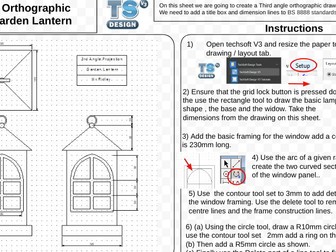
A set of A3 worksheets to guide student through the step by step process of creating 3rd angle orthographic drawings. these sheets are supported by dedicated Youtube clips showing each stage of producing these drawings. The worksheets together with the video clips will allow all students to produce high quality outcomes.
A suggested model would be to set watching the YouTube clip as homework and use the worksheets as prompts in the lesson where students can use the CAD software.
This lesson is focused on students being able to compare the uses of different types of software, and how they are beneficial in a business setting.
Included:
PPT
Worksheet
Starter activity
This Word table introduces students to Open Source software and asks why schools are still prepared to pay for commercial software? It is useful for familiarising students and teachers to software types, what is available for free and what benefits a school gets from commercial software.
10 to 15 hours of lesson time.
Included:
1 x class PPT
1 x summative assessment and answer key
8 x activity resources (revision sheets, input activity handouts, student-centered activity sheets, graphic organizers)
Resource Contents:
80 x slide PPT
6 x carefully scaffolded lessons
6 x differentiated target tasks with model answers
3 x custom made Kahoot! Quizzes
1 x summative assessment lesson
Topics covered:
Software types (system, application, utility)
Operating types (desktop, mobile, server)
Interrupts
High and Low level programming
Programming languages
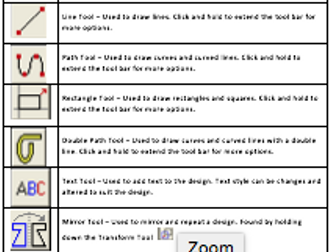
A help sheet for learners containing all the basic tools and descriptions needed to using 2D Design Software.
Can be printed and handed to learners to allow them to work independently when using 2D Design, or printed and displayed as posters in the classroom to support learners using the software.
A 3-lesson unit encompassing the distinctions between Application, Utility and System software, with reference to development of real world indie games. PowerPoints, worksheets and lesson plans provided.
In the final lesson, students will be expected to use an industry style timescale to create a Knowledge Demo PowerPoint.
Outcomes:
To be able to classify by application, system and utility software.
To discern the terms App and Application and the differences between the two.
To understand the need for, uses of and interrelationship between system software and utilities.
To understand the OS’ role in managing processors, memory, IO devices, applications and security.
A year 10 resource I created as part 1 of 3 lessons on Applications, Systems and Utilities. This lesson covers the outcomes and LOs below using identification, description and industry connected content.
Outcomes:
• To be able to classify by application and system software.
Most students:
• To discern applications from apps and to explain the difference.
Some students:
• To understand the interrelationship, particularly between system software and utilities.
Learning Objectives:
• Pupils to gain understanding of the software used in game development through listing and teacher-led discussion.
• Pupils to distinguish between apps and applications through identification exercises, which also draw on literacy skills.
• Pupils to develop ability to identify examples of the three categories of software.
PowerPoint, resources and lesson plan template included.
This Powerpoint explains hardware and software of a computer which could be used with a KS4 GCSE IT class because it explains what hardware is and gives you examples and it explains what software is and it gives you examples.
This 18 page resource is an extract from a Functioal Skills ICT Level 2 Activity Workbook (by the same author) and covers software applications, using nterface features and adjusting system settings. The activity resource contains theory for each of the subjects, followed by multi-chioce and matchmaker activities to test knowedge. Also included are 'how to' help sheets for opening an aplication, installing and uninstalling software and managing unresponding applications. This worksheet/activity includes answers.
This little tutorial shows you how to make a Gantt chart using the free software GanttProject. It's a lot easier to introduce project management concepts when they don't have to be bogged down with the complex Maths involved or use software that's not really designed to do it.
ANSWERS: Computer Software worksheet
Covers
What is Computer Software?
Difference between Application and System Software?
Operating Systems (Definition, Functions, Need)
Suitable for KS3,KS4 and KS5
Watch me solve some questions(Click the link below)
https://youtu.be/ypcixHtJqXY?si=8vyWDoQrbxoXomB_
https://www.tiktok.com/@mvecomputerscience?_t=8qZ9iZtL0sb&_r=1
Exam Board
OCR
AQA
EDEXCEL
MVE resources


 Quick View
 Quick View
 Quick View
 Quick View
 Quick View
 Quick View
 Quick View
 Quick View
 Quick View
 Quick View
 Quick View
 Quick View